ONTAP LDAP Bind Refused After Microsoft October 2026 DC Patches
After the 13 October 2026 Microsoft updates, domain controllers refuse LDAP binds from ONTAP SVMs left at session-security none (CONTAP-821088). Symptoms, cause, and a two-command workaround that drops no sessions.
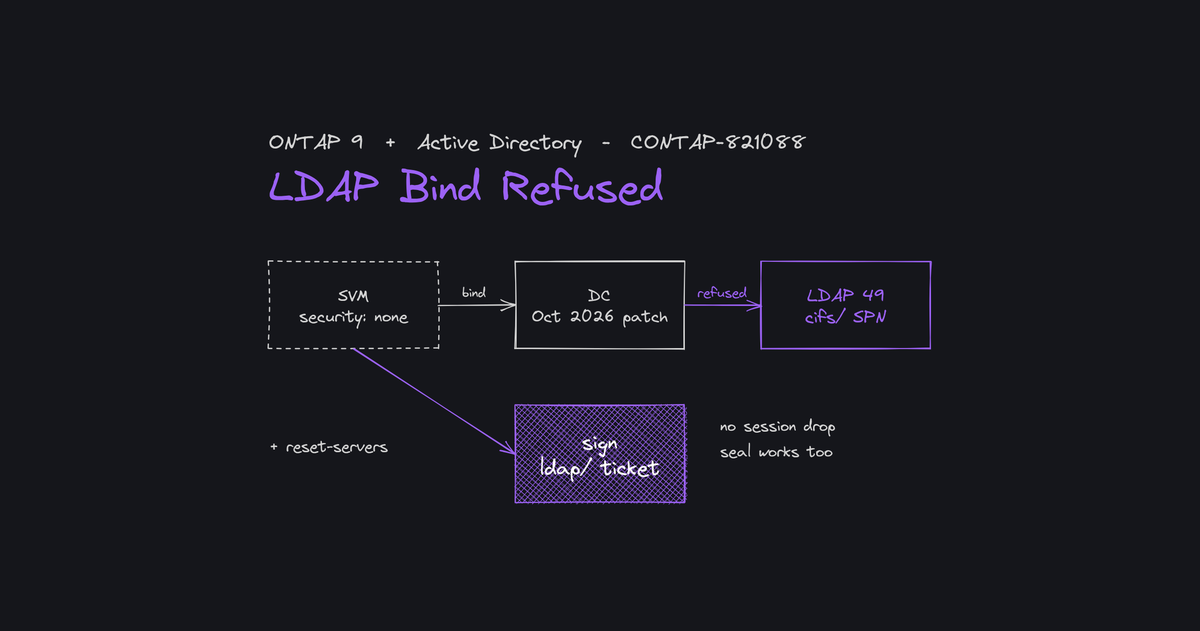
In short. Since the Microsoft cumulative updates of 13 October 2026, domain controllers refuse the LDAP bind of any ONTAP SVM left at the default
session-security-for-ad-ldap none. The array raisessecd.ldap.noServersat EMERGENCY level and Active Directory lookups fail. The workaround is two commands and drops no sessions: set the SVM tosign, then reset the discovered domain controllers. NetApp tracks the defect under public reference CONTAP-821088.
Symptoms
The first sign is a burst of EMERGENCY events in the array's event log:
EMERGENCY  secd.ldap.noServers: None of the LDAP servers configured for Vserver (svm1)
           are currently accessible via the network for LDAP service type
           (Service: LDAP (Active Directory), Operation: SiteDiscovery).
The operation varies: SiteDiscovery, ADgetDCInfo, MapADDomainToNetbiosDomain. secd.conn.auth.failure with "Invalid credentials" can also show up.
The message points to the network ("not accessible via the network"). That is misleading. The failure detail in secd.unexpectedFailure shows the TCP connection succeeds, then the domain controller rejects authentication:
[  3 ms] Successfully connected to ip 192.0.2.10, port 389 using TCP
[     7] Unable to connect to LDAP (Active Directory) service on dc1.example.local (Error: Invalid credentials)
[    11] Successfully connected to ip 192.0.2.11, port 389 using TCP
[    15] Unable to connect to LDAP (Active Directory) service on dc2.example.local (Error: Invalid credentials)
[    15] No servers available for MS_LDAP_AD, vserver: 4, domain: example.local.
Every domain controller answers on port 389, and every one refuses. This is neither a firewall nor a domain controller that is down.
What breaks, what holds
- Breaks: anything that goes through Active Directory LDAP — domain discovery, user and group lookups, name mapping, CIFS server creation or modification, NFS UNIX identity mapping over LDAP, and the administrative operations that depend on them.
- Usually holds: SMB sign-in with Kerberos or NTLM using a
DOMAIN\username. - Can break: sign-in with a UPN (
user@domain.com) ordomain.com\user, which triggers an LDAP lookup to translate the domain name. - The domain controller evaluates the bind at authentication time: the failure appears at the next bind, not on connections already established. Two SVMs with the same setting can therefore fail at different times, depending on their activity.
The cause
With session-security-for-ad-ldap at none — the default — ONTAP authenticates to Active Directory LDAP with a Kerberos ticket requested for the SPN cifs/<domain-controller>. The October 2026 updates harden domain controllers: an LDAP bind is now accepted only with a ticket for the SPN ldap/<domain-controller>. The domain controller answers with LDAP error 49 and this message:
The GSSAPI target name does not match any LDAP SPN's registered for this server
With sign or seal, ONTAP already requests an ldap/<domain-controller> ticket, so the bind succeeds. ONTAP does not switch from none to sign on its own.
Microsoft updates involved, all dated 13 October 2026:
| Domain controller OS | Update |
|---|---|
| Windows Server 2025 | KB5126646 |
| Windows Server 2022 | KB5126655 |
| Windows Server 2019 | KB5126651 |
| Windows Server 2016 | KB5126868 |
NetApp's public pages do not cite any advance Microsoft notice of this change.
False lead: setting the Group Policy "Domain controller: LDAP server signing requirements" to "None" changes nothing. It does not touch the SPN check.
Who is affected?
Any SVM that binds to Active Directory LDAP with session security at none: CIFS SVMs, and NFS SVMs whose LDAP client binds to Active Directory. The public defect page covers the ONTAP 9 releases still in circulation, 9.7 through 9.19.1.
::> vserver cifs security show -fields session-security-for-ad-ldap
Any SVM at none whose domain controllers have received the October updates is exposed, whether it is alerting yet or not.
The workaround, step by step
1. Check the prerequisites
sign and seal rely on Kerberos between the SVM and the domain controllers, which requires forward (A) and reverse (PTR) DNS records for each domain controller. Without a PTR, the bind fails again, on a different Kerberos error ("Cannot determine realm for numeric host address", "Server not found in Kerberos database").
Check from the SVM, at advanced privilege, once per domain controller:
::> set -privilege advanced
::*> vserver services name-service getxxbyyy gethostbyaddr -node <node> -vserver <svm> -ipaddress <DC IP>
The command must return the domain controller's fully qualified name.
Also look for an SVM LDAP client bound to Active Directory (-bind-as-cifs-server true, or -bind-dn and -ad-domain set):
::> vserver services name-service ldap client show -vserver <svm>
2. Set the SVM to sign
::> vserver cifs security modify -vserver <svm> -session-security-for-ad-ldap sign
::> vserver cifs domain discovered-servers reset-servers -vserver <svm>
reset-servers clears what the array has stored about domain controllers and LDAP and NIS servers, then restarts their discovery.
If the SVM has an LDAP client bound to Active Directory, apply the same setting to that client. The two settings are independent, so both need it:
::> vserver services name-service ldap client modify -vserver <svm> -client-config <config> -session-security sign
sign or seal? Both satisfy the domain controller. seal also encrypts the LDAP payload. NetApp reports no performance impact: only authentication traffic is affected, not data I/O.
3. Verify
Connection test, on each node:
::> set -privilege diagnostic
::*> secd connections test -node <node> -vserver <svm>
Expected result: AD LDAP at Successful. A failed LDAP Connection line with Service Configured: false is normal when the SVM has no LDAP client configured.
The SVM's Kerberos cache should then show an ldap/<domain-controller> ticket, the SPN the domain controllers now require:
::*> secd cache show-krb-creds -node <node> -vserver <svm>
Finally, no new secd.ldap.noServers should appear:
::> event log show -message-name secd.ldap.noServers
What the change does not do
- It does not drop active SMB sessions.
- It does not reset the machine account password and asks for no domain credentials.
- On the NFS side, nothing changes until the next operation that goes through LDAP.
What about the DR SVM?
It depends on how the standby SVM is protected:
- SVM DR with
-identity-preserve true: according to the ONTAP documentation, SMB server security is part of the replicated configuration. - SVM DR with
-identity-preserve false: it is not replicated. Apply the setting manually on the destination. - Independent standby SVM (a DR site built separately, without SVM DR): it has its own configuration and must be fixed like the source.
In every case, verify on the destination:
::> snapmirror show -destination-path <svm_dr>: -fields identity-preserve
::> vserver cifs security show -vserver <svm_dr> -fields session-security-for-ad-ldap
The ONTAP fix
According to NetApp, the fix will make ONTAP request an ldap/<domain-controller> ticket instead of cifs/<domain-controller> when the SVM is at none. As of 29 October 2026, no fixed release is available: the defect status is "In Progress". Fixed releases will be listed on the CONTAP-821088 page. The workaround remains valid: there is no reason to move sign back to none once the fix ships.
Field notes
- The error message lies: "not accessible via the network" while the network is fine. The
secd.unexpectedFailuredetail gives the real cause in one line. - Digital Advisor (Active IQ) risk signals depend on AutoSupport. An array that no longer sends AutoSupport, or that NetApp considers out of contract, may not show up — and that is exactly the kind of array that gets caught. No alert in Digital Advisor proves nothing; a
vserver cifs security showacross the whole fleet does. - The workaround is preventive: it applies before and after the domain controllers are patched. Apply it now on every SVM at
none.
Sources
- NetApp CONTAP-821088: LDAP connections to Active Directory fail with Invalid Credentials after Microsoft October 2026 domain controller updates when session-security-for-ad-ldap is "none"
- NetApp: October 2026 LDAP Invalid Credentials after domain controller updates FAQ (full content requires a NetApp Support sign-in)
- NetApp: What will the ONTAP fix for CONTAP-821088 change for AD LDAP Kerberos tickets
- NetApp: Does changing ONTAP LDAP session security to sign or seal affect active CIFS sessions
- NetApp: Which ONTAP LDAP session security setting to use, sign or seal, after October 2026 DC updates
- NetApp: Is there a performance concern when ONTAP LDAP session security changes to sign or seal
- NetApp: Can October 2026 DC patches affect SMB login differently for UPN and NetBIOS username formats
- NetApp: If I use NFS and CIFS, do I need to fix both configurations to prevent or resolve impact
- NetApp: Which Microsoft KB updates in October 2026 are associated with ONTAP LDAP Invalid Credentials
- ONTAP documentation: Learn about ONTAP SnapMirror SVM replication (replicated configuration depends on
-identity-preserve) - ONTAP 9.19.1 command reference: vserver cifs domain discovered-servers reset-servers, vserver services name-service getxxbyyy gethostbyaddr
- Microsoft, 13 October 2026 cumulative updates: KB5126646 (Windows Server 2025), KB5126655 (Windows Server 2022), KB5126651 (Windows Server 2019), KB5126868 (Windows Server 2016)